Agent sandboxes are interesting. They give agents lightweight, disposable environments to work in, isolated from the host and consistent across sessions. Some coding agents come with sandboxing built in, but Goose (as far as I know) doesn’t.
So I wondered if I could give it one.
There are various popular cloud sandbox services that I could have used, but I wanted something that ran locally so that I could experiment without worrying about the bill. I’d heard about OpenSandbox before but never tried it, and it looked like a good fit: it integrates locally with Docker, it has SDKs in various languages, and it can be used over MCP. I decided to see if it could be friends with Goose.
Stack
My environment for this experiment was a Debian 13 server with Docker, Python 3.13, and Node.js 26.12 installed. The pieces I needed to install were:
- OpenSandbox, a general purpose sandbox platform built for AI applications. It’s open source, includes a CLI, an MCP server, and SDKs for various languages. It works with Docker and Kubernetes.
- Goose, a general-purpose AI agent. It’s also open source, runs locally, and works with multiple LLM providers. I connected it to OpenRouter with a free-tier model.
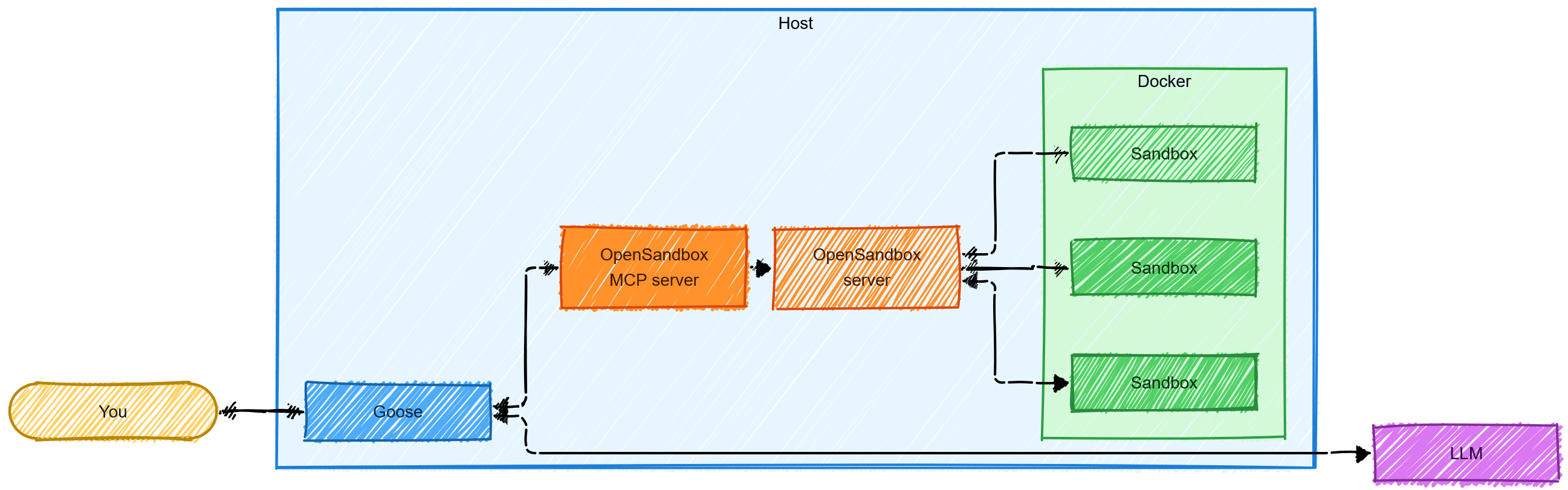
Goose is the agent. OpenSandbox creates and manages sandboxes using Docker (it can also use stronger runtimes such as gVisor or Kata, but I didn’t try those). The OpenSandbox MCP server provides tools that let Goose interact with those sandboxes.
Here’s how the pieces fit together:
OpenSandbox
The first step was to install and configure the OpenSandbox server. The project README has detailed instructions, but it’s actually quite simple: create a virtual environment, install the package with pip, and generate a skeleton configuration file.
python3 -m venv .venv
source .venv/bin/activate
pip install opensandbox-server
opensandbox-server init-config ~/.sandbox.toml --example docker
The last command creates an example configuration for a Docker-based setup and writes it to .sandbox.toml in the home directory. This is a TOML file that configures the OpenSandbox server: the HTTP API, Docker runtime settings, egress network policies, metadata, OpenTelemetry and more. The configuration reference on GitHub lists all the options.
The OpenSandbox server can start containers on your host and run arbitrary code in them, so it supports setting an API key to guard against unauthorized access. My goal was to run sandboxes entirely locally, so this was technically optional; I decided to set it anyway. This also has the advantage of skipping an interactive risk prompt during server startup.
[server]
api_key = "guessme"
The
guessmekey is illustrative and should not be used in production environments.
I also added this API key to the environment, as both the CLI and MCP server need it:
export OPEN_SANDBOX_API_KEY="guessme"With configuration complete, I started the server in the background. By default, it listens on host port 8080.
opensandbox-server &OpenSandbox CLI
Next, I installed the OpenSandbox CLI (it’s distributed as a separate package) and configured it to connect to the OpenSandbox server:
pip install opensandbox-cli
osb config init
osb config set connection.domain localhost:8080
osb config set connection.protocol http
osb config set connection.api_key "$OPEN_SANDBOX_API_KEY"
Sandbox #1
With the server and CLI ready, I created my first sandbox:
osb sandbox create --image golang:1.27 --timeout 30m -o jsonThis command created a sandbox from the golang:1.27 image with a 30-minute TTL (time-to-live). It took a few minutes to run while the image was being pulled from the remote registry, and returned a JSON response with the sandbox id.
{
  "id": "306695b1-35b3-4d8e-a0f5-48cb9689dd35",
  "status": "created",
  "timeout": "0:30:00",
  "image": "golang:1.27"
}
A quick docker ps confirmed that the sandbox was running:
docker ps --format 'table {{.Names}}\t{{.Image}}\t{{.Status}}'
NAMES                                          IMAGE         STATUS
sandbox-306695b1-35b3-4d8e-a0f5-48cb9689dd35   golang:1.27   Up 34 seconds
Next, I ran a command in the sandbox to check the Go version (substitute your own sandbox id in this and the following commands):
osb command run 306695b1-35b3-4d8e-a0f5-48cb9689dd35 -o raw -- go version

[...]

go version go1.27.3 linux/amd64
I also tried writing and running a simple Go program inside the sandbox:
osb command run 306695b1-35b3-4d8e-a0f5-48cb9689dd35 -o raw -- sh -c 'cat > /go/src/main.go <<EOF
package main

import "fmt"

func main() { fmt.Println("Hello, OpenSandbox!") }
EOF
go run /go/src/main.go'

[...]

Hello, OpenSandbox!
Since the sandboxes are just Docker containers, you can shell into a running sandbox with docker exec and inspect its contents:
docker exec -it sandbox-306695b1-35b3-4d8e-a0f5-48cb9689dd35 bash
root@c9b5f2e8b6e6:/go#
You can get a list of running sandboxes with osb sandbox list, and terminate a running sandbox with osb sandbox kill:
osb sandbox kill 306695b1-35b3-4d8e-a0f5-48cb9689dd35
osb sandbox list
As expected, the output is:
ℹ️ No sandboxes found.OpenSandbox MCP
Creating sandboxes from the CLI works, but I wanted Goose to create and use them on its own. OpenSandbox includes an MCP server that exposes its sandbox management functions as tools that any MCP-compatible agent can call. This means that once Goose is connected to it, it can spin up sandboxes, write and execute code, and perform all other sandbox-related operations autonomously.
The MCP server ships as a separate package, so the first step was to install it:
pip install opensandbox-mcpThe OpenSandbox MCP server connects to the OpenSandbox server over HTTP using the OpenSandbox API key set earlier. It can expose its MCP interface via stdio or streamable HTTP. I chose the latter and started the server, pointing it at the OpenSandbox server’s address and running it in the background so I could keep using the same terminal:
opensandbox-mcp --domain localhost:8080 --protocol http --transport streamable-http &By default, the server listens on port 8000, so the MCP endpoint is http://localhost:8000/mcp.
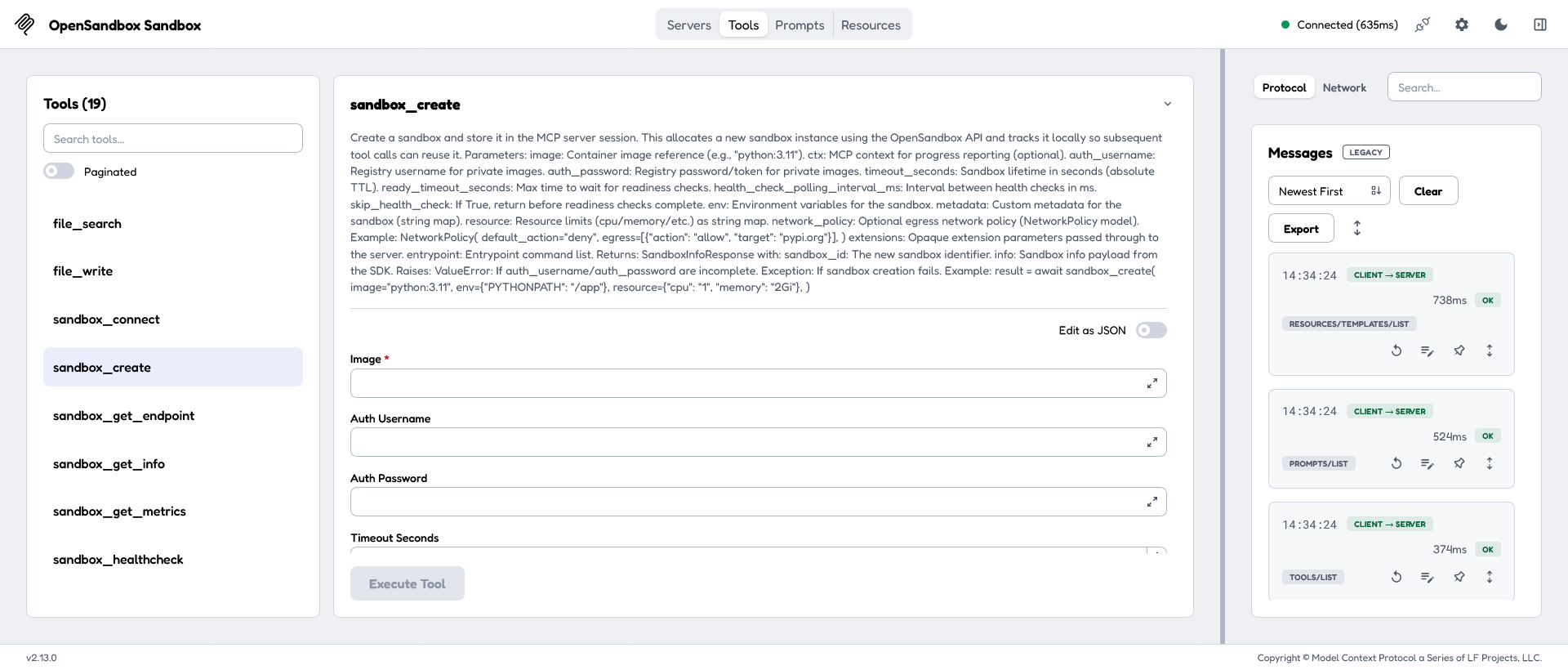
Before moving on to Goose, I checked that the MCP server was working with MCP Inspector, a browser-based tool for working with MCP servers:
npx @modelcontextprotocol/inspector --server-url http://localhost:8000/mcp --transport httpThis command started the MCP Inspector and opened its web interface in the browser. I connected to the server and clicked the Tools tab to see the available tools: 19 tools in all, including sandbox_create, command_run, file_write, and many others.
Goose
Installing Goose takes one command:
curl -fsSL https://github.com/aaif-goose/goose/releases/download/stable/download_cli.sh | bashThen, configure it to use a model provider. I used OpenRouter with a free-tier model, nvidia/nemotron-3.5-super-vl:free:
goose configure

◇  What would you like to configure?
│  Configure Providers
│
◇  Which model provider should we use?
│  OpenRouter
[...]
◇  Select a model:
│  Enter a model not listed...
│
◆  Enter the model name:
│   nvidia/nemotron-3.5-super-vl:free
│
◐  Checking your configuration...
└  Configuration saved successfully to ...
Goose, like most other coding agents, can work with MCP servers out of the box. I fed the MCP server details into the Goose configuration wizard.
goose configure

◇  What would you like to configure?
│  Add Extension
│
◇  What type of extension would you like to add?
│  Remote Extension (Streamable HTTP)
│
◇  What would you like to call this extension?
│  opensandbox-mcp
│
◇  What is the Streaming HTTP endpoint URI?
│  http://localhost:8000/mcp
│
◇  Please set the timeout for this tool (in secs):
│  300
│
◇  Enter a description for this extension:
│  OpenSandbox MCP server
│
◇  Would you like to add custom headers?
│  No
│
└  Added opensandbox-mcp extension
└  Configuration saved successfully to ...
With the setup out of the way, I was able to start a Goose session and confirm that it was connected to the free-tier OpenRouter model:
goose

    __( O)>  ● new session · openrouter nvidia/nemotron-3.5-super-vl:free
   \____)    20261030_2 · /home/vikram
     L L     goose is ready
  ⏳ loading extensions in background...
  ╌╌╌╌╌╌╌╌╌╌╌╌╌╌╌╌╌╌╌╌ 0% 0/1.0M
>
  ✓ extensions ready
I asked Goose to list the tools available to it to confirm that it was connected to the OpenSandbox MCP server:
> List your tools.

Here are all the tools and capabilities available to me:

[...]

## 🏗 Sandbox Management (`opensandbox-mcp`)

| Tool                                       | Purpose                           |
|--------------------------------------------|-----------------------------------|
| `opensandbox-mcp__sandbox_create`          | Create an isolated sandbox        |
| `opensandbox-mcp__sandbox_connect`         | Connect to an existing sandbox    |
| `opensandbox-mcp__sandbox_kill`            | Terminate a sandbox               |
| `opensandbox-mcp__sandbox_list`            | List sandboxes with filters       |
| `opensandbox-mcp__sandbox_get_info`        | Get sandbox details               |
| `opensandbox-mcp__sandbox_get_metrics`     | Get resource metrics              |
| `opensandbox-mcp__sandbox_healthcheck`     | Check sandbox health              |
| `opensandbox-mcp__sandbox_renew`           | Extend sandbox lifetime           |
| `opensandbox-mcp__sandbox_get_endpoint`    | Get a network endpoint for a port |
| `opensandbox-mcp__command_run`             | Run a command in a sandbox        |
| `opensandbox-mcp__command_interrupt`       | Interrupt a running command       |
| `opensandbox-mcp__file_read`               | Read a file from sandbox          |
| `opensandbox-mcp__file_write`              | Write a file to sandbox           |
| `opensandbox-mcp__file_create_directories` | Create directories in sandbox     |
| `opensandbox-mcp__file_delete`             | Delete files in sandbox           |
| `opensandbox-mcp__file_delete_directories` | Delete directories in sandbox     |
| `opensandbox-mcp__file_move`               | Move/rename files or directories  |
| `opensandbox-mcp__file_search`             | Search files matching a pattern   |
| `opensandbox-mcp__file_replace_contents`   | Replace content inside files      |

[...]

## Active Extensions

The following extensions are currently active: **analyze, developer, tom, apps, extensionmanager, summon, opensandbox-mcp**.

Is there a particular tool or capability you'd like help using?
  ⏱ 21.99s
  ╌╌╌╌╌╌╌╌╌╌╌╌╌╌╌╌╌╌╌╌ 1% 13k/1.0M
Notice here that Goose still has its
developerextension active. This means that it can still read and write files and run system commands with your user privileges on the host. To make Goose use the sandbox, you must explicitly prompt it to do so. That said, the prompt is still only an instruction. For stronger isolation, disable thedeveloperextension altogether.
Sandbox #2
I asked Goose to do the same thing I previously did with the OpenSandbox CLI:
> Create a Golang 1.27 sandbox. Return the Go version number.

[...]

I'll create a Golang 1.27 sandbox and verify the Go version. Let me set that up.

The sandbox is running. Now let me check the Go version inside it.

**Go version: `go1.27.3 linux/amd64`**

The sandbox (ID: `1baf55e2-447f-43ee-8311-1d4054de2fac`) is running with the `golang:1.27` image, and `go version` confirms Go 1.27.3 is installed.

  ⏱ 29.49s
  ╌╌╌╌╌╌╌╌╌╌╌╌╌╌╌╌╌╌╌╌ 1% 13k/1.0M
So far so good. Now for something a little more demanding.
Sandbox #3
I asked Goose to write and test a Go program inside a fresh sandbox and then move the tested code from the sandbox to the host. Here’s an abridged transcript of the session:
Create an alpine sandbox. Install a complete Go development toolchain.

Write a Go program in the sandbox that counts word frequencies. It should take text as arguments or from stdin, be case-insensitive, ignore punctuation, support an -n flag for how many top words to show (default 5), and end with a total=X unique=Y line. Run it on a few inputs you choose, show the commands and outputs, and say whether the results are correct.

When you're done, move the source code from the sandbox to the host, then delete the sandbox.

[...]

Done. Here's a complete summary of what was accomplished.

## 1. Sandbox creation & Go toolchain install

Created an Alpine 3.20 sandbox (`667f5c98-...`) and installed the full Go development toolchain:

apk add --update go git build-base

Result: go version go1.22.10 linux/amd64 (plus git, gcc, make, etc.).

## 2. Go program: word frequency counter (`/app/wordfreq.go`)

Features implemented:
- **Input**: text from command-line arguments, or from stdin if no args are given
- **Case-insensitive**: all words lowercased via `strings.ToLower`
- **Punctuation ignored**: any non-letter/non-digit Unicode rune is treated as a word separator (`strings.FieldsFunc` with `unicode.IsLetter`/`IsNumber`)
- **`-n` flag**: number of top words to show, default 5
- **Footer**: always prints `total=X unique=Y`
- Ties broken alphabetically for deterministic output

## 3. Test runs (commands + outputs)

**Test 1 — arguments, default -n:**

$ ./wordfreq "Hello, world! Hello Go."
1       hello   2
2       go      1
3       world   1
total=4 unique=3


[...]

## 4. Correctness verdict

All results are **correct**:

| Test | Expected                                         | Got              | Verdict |
|------|--------------------------------------------------|------------------|---------|
| 1    | hello×2, go×1, world×1; total 4, unique 3        | ✓ matches        | Correct |
| 2    | the×3, dog×2; 14 words total, 11 unique          | ✓ matches        | Correct |
| 3    | go×3 ("Go", "GO", "go"), is×2; 9 words, 6 unique | ✓ matches        | Correct |
| 4    | no words                                         | total=0 unique=0 | Correct |
| 5    | -n 0 suppresses list                             | only footer line | Correct |
Punctuation (commas, periods, exclamation marks) is correctly stripped, casing is normalized, and argument vs. stdin input both work.

## 5. Source moved to host, sandbox deleted

The source was copied from the sandbox to the host working directory:

- /home/vikram/wordfreq.go
- /home/vikram/go.mod

You can build and run it on the host with:

cd /home/vikram
go build -o wordfreq .
./wordfreq "Hello, world! Hello Go."

The Alpine sandbox `667f5c98-c95c-42ef-8630-5431623be38d` has been terminated (`status: killed`).
  ⏱ 2m 38s
  ╌╌╌╌╌╌╌╌╌╌╌╌╌╌╌╌╌╌╌╌ 2% 21k/1.0M
This was a successful experiment. Goose connected to the OpenSandbox MCP server and used its tools to create sandboxes from a prompt, write and run code in them, and clean up afterwards. I rebuilt the code on the host and confirmed Goose’s results were correct.
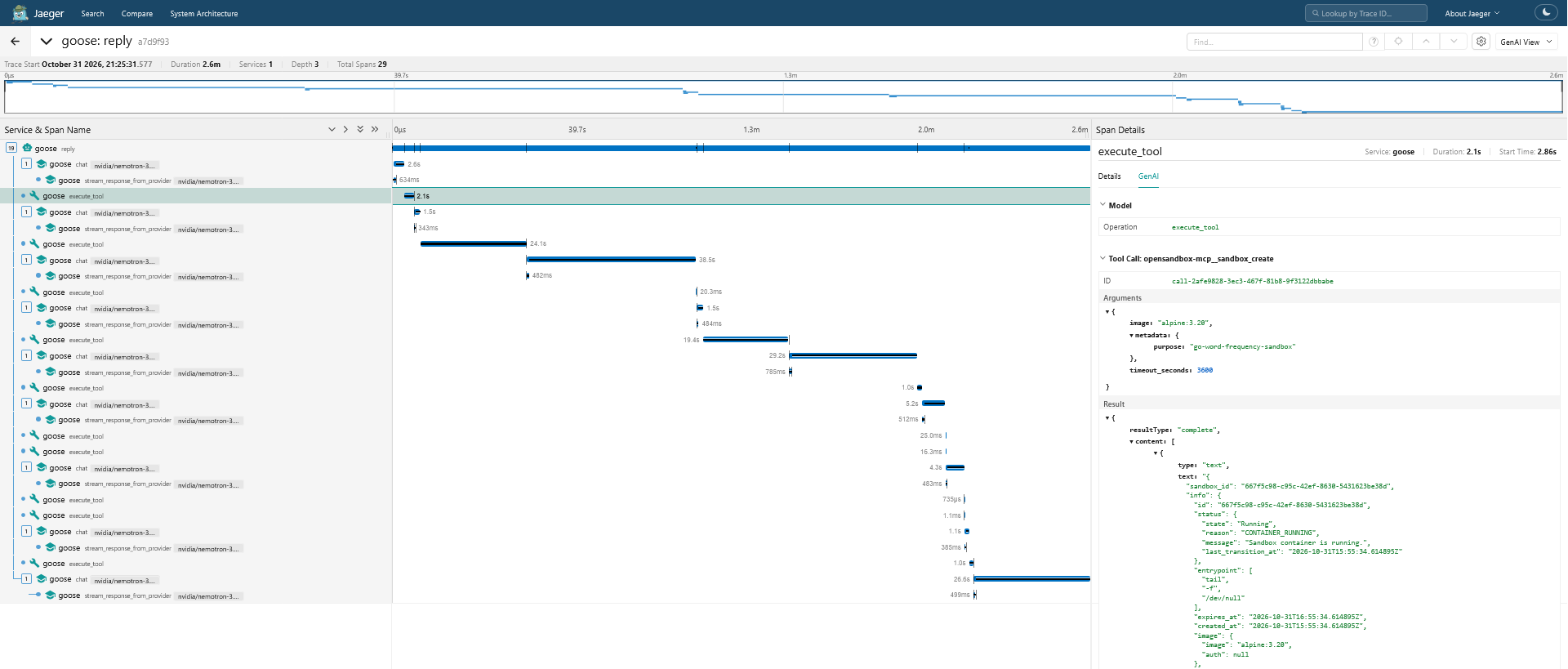
To see exactly what Goose did, I also had it export traces to Jaeger using OpenTelemetry. Here’s a trace of the full session, with the highlighted line showing the tool call for sandbox creation.
It’s worth noting here that, because the sandbox itself has no path to the host filesystem, Goose used its
developerextension for the final step of writing the source files from the sandbox to the host. Disabling thedeveloperextension would remove Goose’s shell and file access to the host, but would then likely also cause this final step to fail.
Summary
So yes, you can give Goose a local sandbox and it will run your tasks in isolation there if you tell it to. The sandboxes run locally on your own system with no cloud account or per-sandbox cost, and since they’re just Docker containers, you can inspect and manage them with ordinary Docker commands. The MCP interface means that the same setup should work equally well with other MCP-compatible coding agents.
While this is fine (and fun) for local experiments, it’s still insecure:
- Goose continues to have access to its
developerextension so, barring the instruction in the prompt, there’s nothing preventing it from reading, writing and executing commands on the host. - The sandboxes also have unrestricted outbound access, so code running inside them can still send data out to the wider Internet.
Restricting Goose’s built-in tools and applying OpenSandbox’s egress network policies can help with both these issues.