AI can make financial analysis easier, helping to identify patterns, summarise data, and test assumptions - but only if you’re willing to give it your data. I already had all my personal bank statements and portfolio summaries queued up in CSV, ready to go. But there was one problem: there was no way I was uploading all that data to the cloud.
So I decided to try a local model instead. My goal was simple: build a workflow where every CSV, every prompt, and every generated report stayed on my own laptop. I knew this would be slow - but I was happy to sacrifice speed for privacy.
Stack
I needed to install two pieces:
-
Docker Model Runner, Docker’s tool to run AI models locally. It works with models from Docker Hub and Hugging Face, and supports inference via llama.cpp, vLLM and Diffusers.
-
Goose, a general-purpose AI agent by the Agentic AI Foundation (AAIF). It’s open source, runs locally, works with multiple LLM providers, and supports reusable recipes for repetitive tasks.
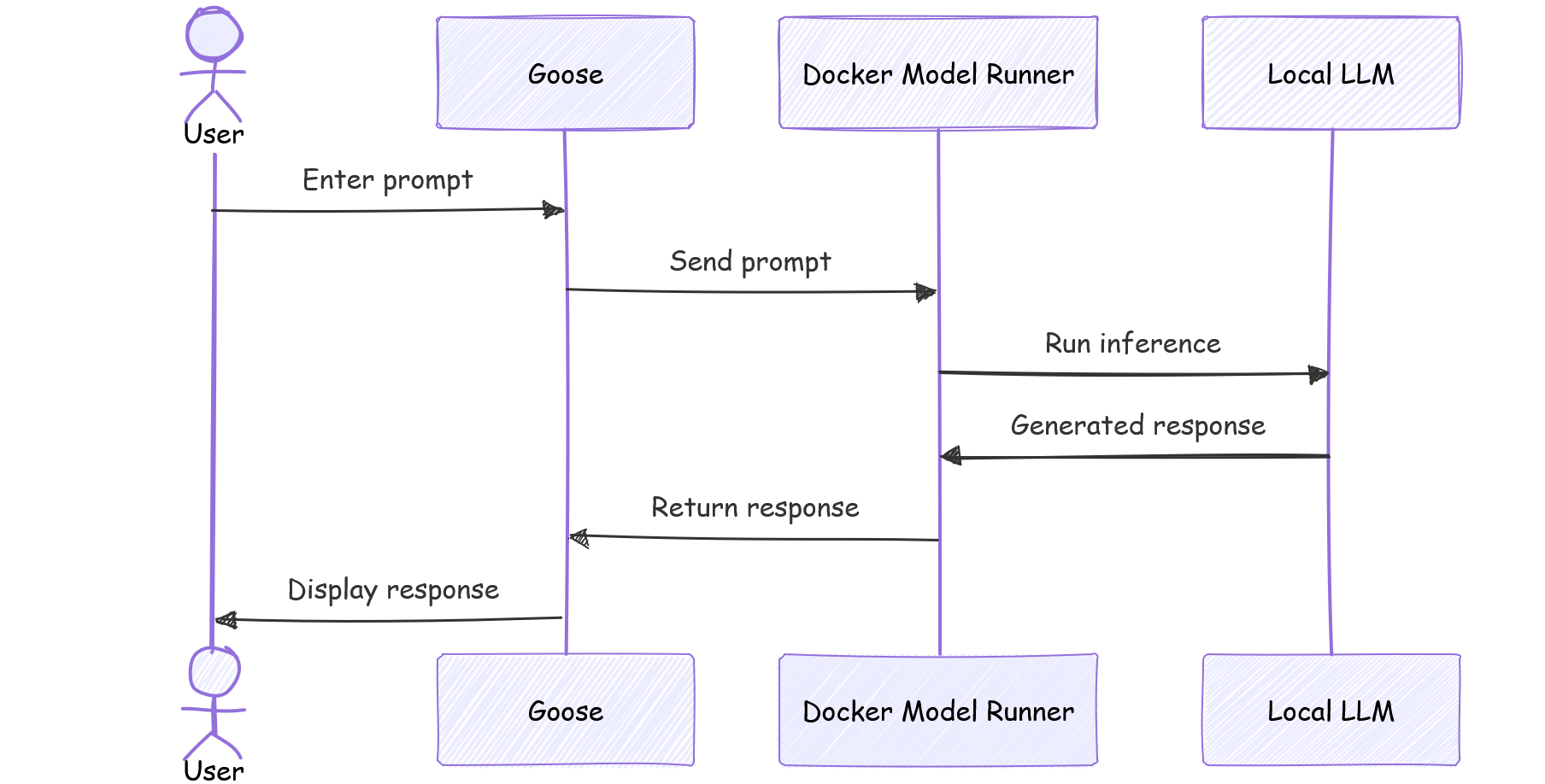
Docker Model Runner provides the LLM. Goose provides the agent orchestration layer.
Here’s what the flow looks like:
Here are the commands I used to install them on Debian:
sudo apt-get update && sudo apt-get install docker-model-plugin
curl -fsSL https://github.com/aaif-goose/goose/releases/download/stable/download_cli.sh | bash
One pleasant surprise while researching this setup was discovering that Goose now has local inference built-in. This makes the entire process significantly easier, because Goose can download and run supported models directly. I used Docker Model Runner here because I already use Docker containers for other local workflows, but Goose’s built-in support is a great standalone alternative that I’ll definitely test in the future.
Next, it was time to pick a model. I wanted a model that could answer questions reliably and summarize large amounts of structured data. After some research, I decided to try Gemma 4:
- It performs well on question answering and summarisation, both of which are useful for financial analysis.
- It’s a relatively small and fast download (3.9 GB), which makes it feasible to run on a laptop and easy to swap out if it underperforms.
I pulled the model and ran a quick test:
docker model pull ai/gemma4:E2B
docker model run ai/gemma4:E2B

> what's 10% of 200?
[...]
10% of 200 is **20**.
Configuration
By default, Docker Model Runner exposes an OpenAI-compatible API for locally hosted models, runs on host port 12434, and uses llama.cpp for inference. The engine base path is /engines/llama.cpp/v1/chat/completions. Local inference is slower than a cloud API, so I needed to configure a longer-than-usual timeout. All this information fed into the Goose configuration below.
goose configure
[...]
o  Which model provider should we use?
|  OpenAI
|
o  Would you like to configure advanced settings?
|  Yes
|
o  Enter OPENAI_BASE_URL (optional, press Enter to skip)
|
o  Provider OpenAI requires OPENAI_HOST, please enter a value
|  http://localhost:12434
|
o  Provider OpenAI requires OPENAI_BASE_PATH, please enter a value
|  /engines/llama.cpp/v1/chat/completions
|
o  Enter OPENAI_TIMEOUT (optional, press Enter to skip)
|  1500
|
o  Model fetch complete
|
o  Select a model:
|  docker.io/ai/gemma4:E2B
|
O  Checking your configuration...
—  Configuration saved successfully to ...
With the setup out of the way, I was able to start a Goose session and confirm that it was connected to my local Gemma model:
goose

    __( O)>  ● new session · openai docker.io/ai/gemma4:E2B
   \____)    20260722_2 · /home/vikram
     L L     goose is ready
  ╌╌╌╌╌╌╌╌╌╌╌╌╌╌╌╌╌╌╌╌ 0% 0/128k
› Enter to send · Ctrl+J newline
Prompt
The prompt turned out to be the most interesting aspect of this project. Rather than a generic summary, I wanted Goose to perform specific analysis and explicit input data validation before making any conclusions.
Here’s one of the prompts I used:
I have a folder of CSV files in ./bank-data/. Each file represents one month's personal bank statement and is named by month. Each CSV contains the following columns: date, description, amount, debit/credit, balance

Please perform the following tasks:

1. Read every CSV file in the folder.
2. Validate the input data before performing any analysis.
   - Report missing files or months.
   - Report malformed rows or missing values.
   - Check whether the running balance is internally consistent within each file.
   - Highlight duplicate transactions.
3. Calculate for each month:
   - Total income
   - Total expenses
   - Net cash flow (income - expenses)
4. Identify recurring transactions.
   - Group similar transactions based on their descriptions.
   - Estimate whether each recurring transaction is monthly, weekly or irregular.
5. Identify one-off or unusual expenses.
   - List the ten largest by amount with a brief explanation of each.
6. Highlight any notable trends or observations, such as:
   - Spending categories that changed significantly
   - Months with unusually high or low spending
   - Unexpected income
   - Potential opportunities to reduce expenditure

Save the report as ./bank-data/review-<DATE>.md

Create the report in Markdown format with these sections: summary, monthly cash flow, recurring transactions, largest expenses, observations, data quality issues.

If any requested calculation cannot be completed because of missing or inconsistent data, explain the reason instead of making assumptions.
Item #2 is important. If the source data is bad, the conclusions will be bad too. By explicitly telling Goose to look out for data inconsistencies, I was setting it up to catch errors early, which I could then review and fix manually.
Results
As I anticipated, execution speed was the biggest problem. My mid-spec laptop struggled while running the local model, with a typical analysis run taking 45-50 minutes to complete. This made it a good “start it before lunch” job: kick it off, get something to eat, and come back to a finished report.
Even though it’s slow, I still like this approach. Apart from the initial model download, the entire workflow runs locally, with no requirement for Internet access. There are no API costs, no need to count tokens, and both source files and final report remain entirely private and secure on my laptop. For personal financial data, this privacy-first architecture is perhaps the most important aspect of the system.